AI voice agents
An agent is a single AI voice persona that places and answers phone calls for your organization. It has its own language model, voice, greeting, behavior and tools — everything that decides how a call sounds and what the agent can do. You build and tune agents in the agent builder at /agent/setup, then test and publish them. This page explains the agent concept and maps every builder tab to its documentation.
What an agent is
Each agent bundles together:
- a voice pipeline and language model that drive the conversation;
- a voice that speaks and a transcriber that listens;
- a system prompt, greeting and key messages that shape its personality and how it opens and closes a call;
- engine behavior that controls pacing — interruptions, silence and turn-taking;
- calling settings for inbound and outbound use;
- optional knowledge and tools so it can answer from your documents and take real actions; and
- guardrails and channels for compliance and for reaching people on messaging apps.
Agents live inside projects, following the Organization → Projects → Agents structure from the overview. Once an agent is published you can point campaigns and inbound numbers at it.
The builder tab model
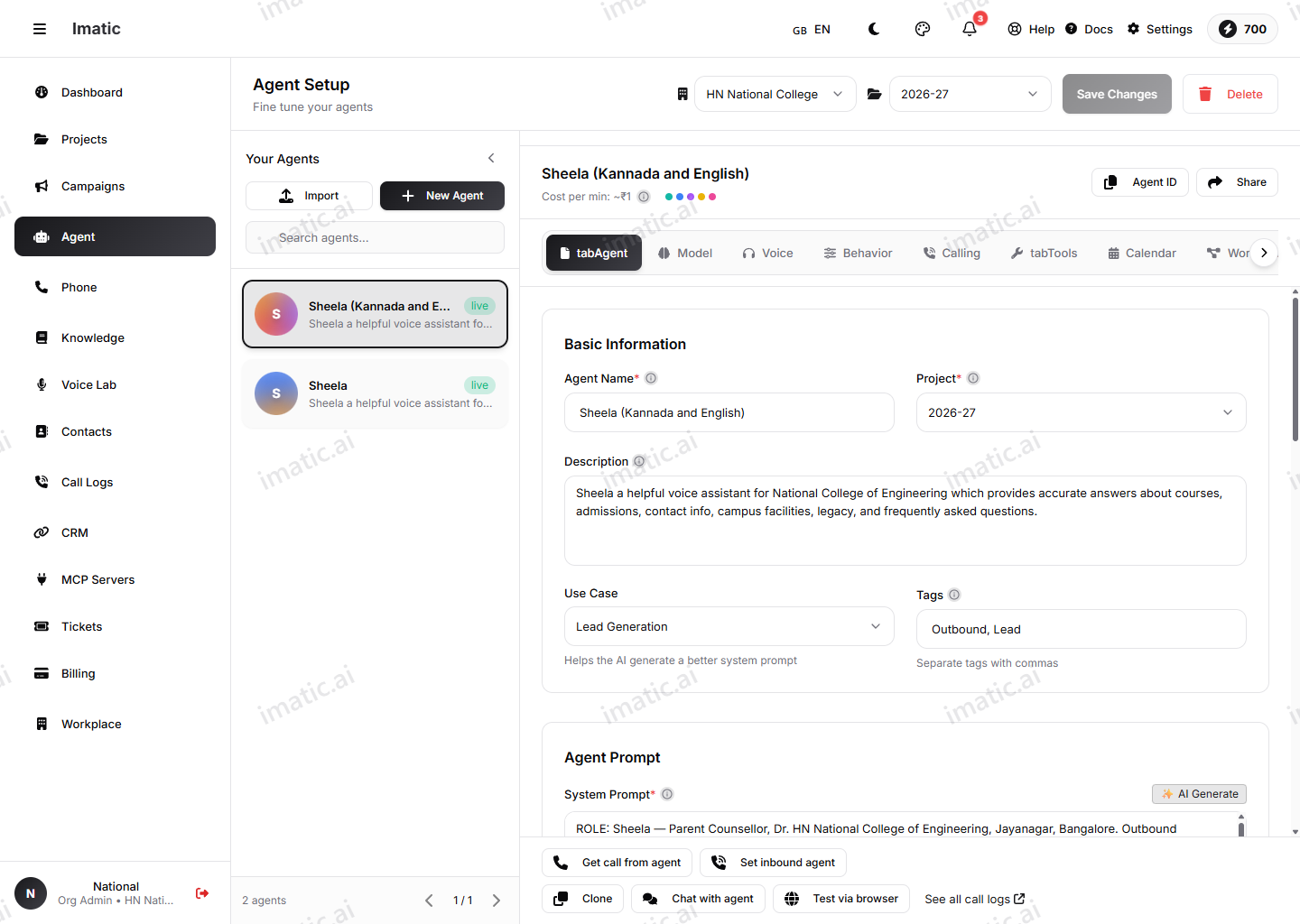
The builder at /agent/setup organizes configuration into eleven tabs. You move through them left to right, saving as you go. The core tabs each have their own documentation page:
- Agent — name, description, use case and starting template, plus the system prompt, the greeting and the end / fallback / busy / voicemail messages, and the Published and Active toggles. This is where every new agent begins; see Create your first agent.
- LLM — the voice pipeline mode, LLM provider and model, temperature, token limits, advanced parameters, a fallback model, and the RAG / knowledge-base linkage (see Knowledge & RAG).
- Audio (Voice & audio) — multi-provider speech-to-text and text-to-speech (provider, model, voice, and provider-specific tuning).
- Engine (Conversation behavior) — barge-in and interrupt handling, voice-activity-detection padding, response delay, silence handling and filler words.
- Calling — inbound/outbound, maximum duration, auto-hangup, assigned numbers and webhooks.
- Tools — bind the agent's functions, connect MCP servers, and open the Workflow Builder.
- Calendar — connect Google or Outlook via OAuth so the agent can work with availability.
- Workflow — a visual call-flow builder, launched from the Tools tab.
- Function Logs — per-function metrics: call counts, latency and errors for the functions this agent uses.
- Guardrails — compliance and data-collection controls (covered below).
- Channels — reach people on messaging apps: WhatsApp, Telegram, Facebook Messenger and an embeddable web widget.
Workflow Builder
The Workflow tab opens a visual call-flow builder (launched with the Open Workflow Builder button on the Tools tab). It lets you design deterministic, node-based call flows — questions, conditions, tool calls, webhooks and transfers — for agents that need a scripted path rather than open-ended conversation.
Function Logs
The Function Logs tab shows how the agent's bound functions are performing during real calls: how often each function is called, its latency, and any errors. Use it to spot a slow or failing tool before it hurts call quality.
Guardrails
The Guardrails tab keeps the agent safe and compliant. It controls:
- Content guardrails — a list of prohibited topics the agent avoids and redirects away from.
- PII handling — how personally identifiable information is treated in transcripts (mask, redact or allow), plus a per-type transcript PII redaction picker (SSN, credit card, email, phone, address, date of birth, bank account).
- Compliance mode — Standard, Strict, HIPAA or PCI-DSS; the stricter modes enable additional security measures and logging.
- Data collection — the collected fields the agent tries to capture and the required fields it must obtain (prompting the caller if they're missing).
- Post-call analysis — opt-in auto-summarize, sentiment analysis and intent detection.
The Channels tab is for messaging apps — WhatsApp, Telegram, Facebook Messenger and a web widget. Email follow-up is not a channel: it's the send_email function on the Tools tab.
You don't have to fill in every tab to get going. A name, a model, a voice and a greeting are enough for a first test. Add knowledge and tools once the basics sound right.
Test before you publish
The builder pairs with two test surfaces so you can try an agent before it touches real calls:
- Voice test at /agent/interface — talk to the agent and hear it respond.
- Chat test at /agent/chat — exchange text turns to check logic and prompts quickly.
The full path from a blank agent to a published one is in Create your first agent.