Guardrails & compliance
The Guardrails tab keeps your agent safe, compliant and useful on every call. It controls what the agent will and won't talk about, how personally identifiable information (PII) is treated in transcripts, which regulatory posture the agent operates under, what data it tries to collect from the caller, and which analyses run after the call ends. Set all of this in the agent builder at /agent/setup.
The tab is organized into five sections: Post-Call Analysis, Data Collection, Compliance & Privacy, Content Guardrails and Transcript PII Redaction.
Post-call analysis
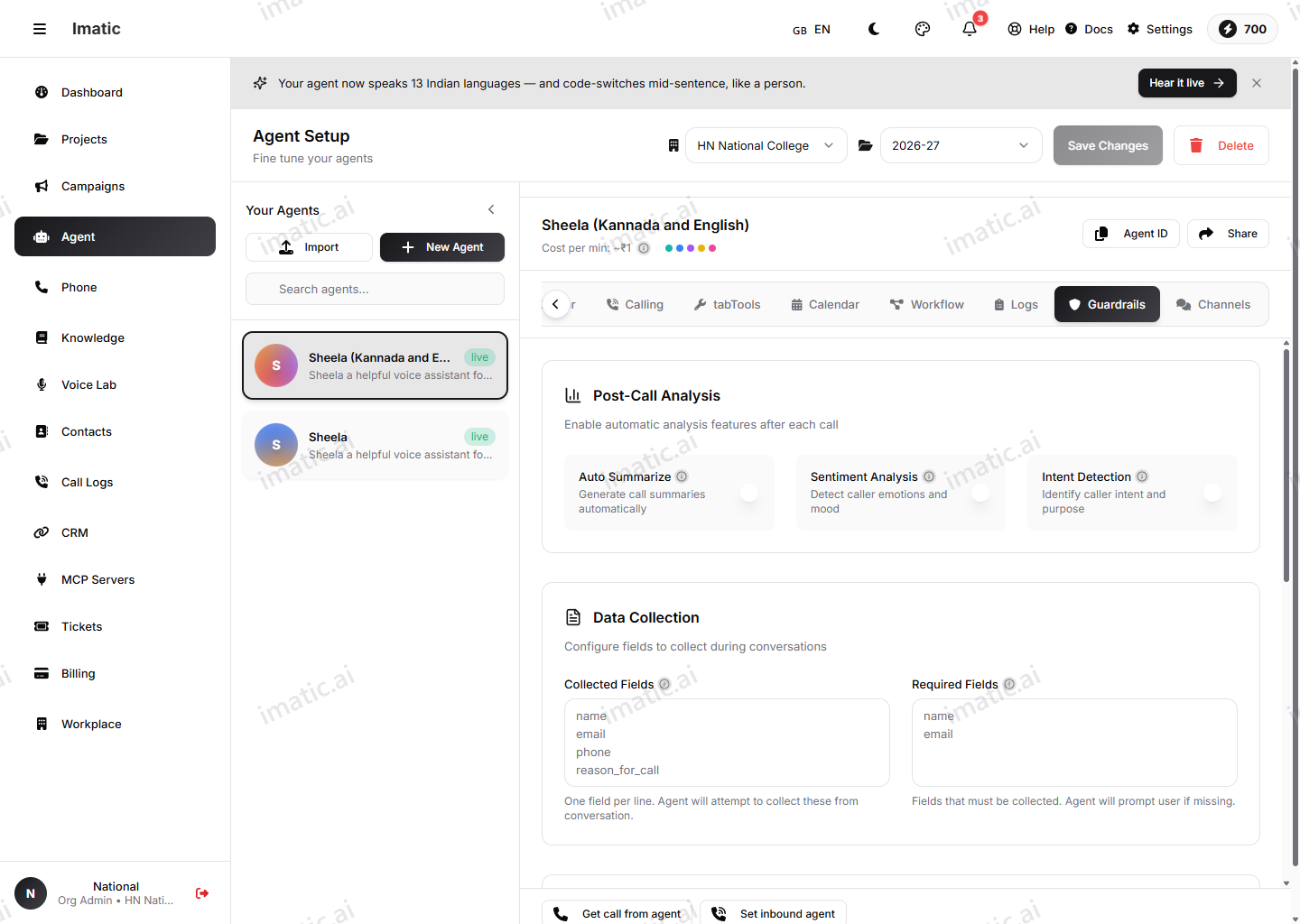
These toggles decide which automated analyses run after each call completes. Each is an independent switch:
- Auto Summarize — generate a call summary automatically after every call.
- Sentiment Analysis — detect the caller's emotions and mood across the call.
- Intent Detection — identify the caller's intent and categorize the call.
The results surface on the call record. See Call logs for where summaries, sentiment and intent appear once these are on.
Sentiment and intent are per-agent toggles. Turn them on here so they're computed and stored for each call. Sentiment can also be influenced from the Behavior (Engine) tab; the canonical place to enable post-call analysis is this tab.
Data collection
This section defines the structured fields the agent works toward during the conversation. Both inputs take one field per line.
- Collected Fields — the data points the agent attempts to extract from the conversation (for example
name,email,phone,reason_for_call). The agent will try to capture these but won't force them. - Required Fields — fields that must be obtained before the call ends. If a required field is still missing, the agent prompts the caller for it.
Use required fields sparingly — they make the agent insist, which is right for a callback number or an email but wrong for nice-to-have details.
Compliance & privacy
Two settings set the agent's privacy posture.
PII Handling controls how personally identifiable information is treated in transcripts. Choose one of:
- Mask (default) — obscure PII while keeping the transcript readable.
- Redact — remove PII from the transcript entirely.
- Allow — keep PII as spoken, with no special handling.
Compliance Mode sets the regulatory posture for the agent:
- Standard (default)
- Strict
- HIPAA
- PCI-DSS
Selecting HIPAA or PCI-DSS surfaces an in-builder notice that the mode enables additional security measures and logging.
The stricter modes raise the bar inside the product, but compliance is end-to-end. Make sure your surrounding infrastructure and processes also meet the requirements of the regime you select.
Content guardrails
Prohibited Topics is a free-text list — one topic per line — of subjects the agent should avoid (for example competitor pricing, internal policies, legal advice, medical diagnosis). The agent steers away from these topics and redirects the conversation. A live counter shows how many topics you've added.
This is the most direct lever for keeping an outbound or inbound agent on-script: name the conversations you don't want it to have, and it will deflect them rather than improvise.
Transcript PII redaction
Separately from the overall PII-handling mode, you can pick exactly which types of sensitive information are redacted from transcripts. Toggle any combination of:
- SSN
- Credit card
- Phone
- Address
- Date of birth
- Bank account
Each type is a chip you switch on or off. Selected types are removed from the stored transcript automatically. This pairs with PII Handling above: handling sets the overall strategy, while this list pins down the specific categories to scrub.
Transcript PII redaction lives here on the Guardrails tab, not on the Voice (Audio) tab. That tab points back here for it.